
 Prompt Writing
  AI Tips & Tricks
Have you ever wanted to learn something new — maybe a language, a bit of DIY, how to cook a proper roast, or even how to play the guitar — but had no idea where to begin?
You're not alone. Most of us have a mental list of things we'd love to pick up "one day." But life gets busy. Classes cost money. YouTube videos go on forever. And let's be honest, Googling "how to learn French" returns about a billion results, none of which feel quite right.
Here's the good news: AI can act like a free, endlessly patient personal tutor — one that's available whenever you are, never judges you, and explains things in whatever way makes sense to you. You don't need to be techy. You don't need any special apps. If you can type a sentence, you can use AI to start learning something new today.

Why AI Is Brilliant for Learning Traditional learning often follows a one-size-fits-all approach.
A textbook starts at chapter one whether you need it or not. A YouTube tutorial assumes you know things you might not. AI is different. You can tell it exactly where you're starting from, what you want to achieve, and how you like to learn. It adjusts to you, not the other way around.
Here are a few things AI does really well when it comes to learning:
- It breaks big topics into small, manageable steps.
- It explains things in plain language (or simpler, if you ask).
- It gives you practice exercises tailored to your level.
- It answers your follow-up questions without getting impatient.
- And it can quiz you, test you, or summarise what you've covered.
Think of it like having a helpful friend who happens to know a bit about everything.
How to Get Started: Your First Learning Prompt
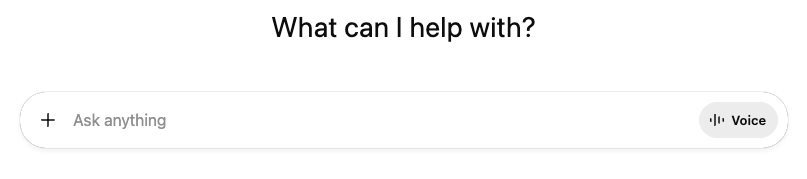
(Above is an image of a typical prompt box where you type in your query)
The key to using AI for learning is telling it what you want to learn and where you're starting from.
The more detail you give, the better the response.
Here's a simple formula you can use:
"I want to learn [topic]. I'm a complete beginner with no experience. Can you create a simple step-by-step learning plan I can follow for 15 minutes a day over the next 4 weeks?"
That's it. Try swapping in whatever interests you — photography, Spanish, bread-making, budgeting, watercolour painting, even basic home plumbing.
AI will come back with a structured plan you can actually follow.
Make It Personal
One of the best things about learning with AI is that you can shape the experience around your life.
Here are some ways to do that:
- Tell it how much time you have.
- If you've only got ten minutes on your lunch break, say so. AI will adjust the plan to fit.
- Tell it how you learn best.
- Prefer watching videos? Ask it to suggest good ones.
- Like reading? Ask for short written explanations.
- Learn by doing? Ask for hands-on exercises.
- Tell it what you already know. Even if it's just a tiny bit.
"I know a few words of Spanish from holiday" is useful context that stops AI from starting too basic.
Ask Questions Like You Would a Teacher

Don't be afraid to ask follow-up questions.
That's where AI really shines. If something doesn't make sense, just say so.
You might say:
"Can you explain that in simpler terms?" or "Give me an example I'd see in real life" or "I didn't understand the bit about [X] — can you try again?"
AI won't roll its eyes. It won't sigh. It'll just have another go, often explaining it better the second time around.
You can also ask it to test you.
Try something like:
"Give me a quick quiz on what I've learned so far."
It's a surprisingly effective way to check whether things are sinking in.
Real Examples You Can Try Today
Here are a few prompts to get you going. Just copy one into ChatGPT, Claude, or whichever AI tool you prefer:
For learning to cook:

"I'm a complete beginner in the kitchen. Can you teach me five simple meals I can make this week, with step-by-step instructions and a shopping list?"
For picking up a language:
"I want to learn basic Italian for a holiday in June. I know zero Italian. Can you teach me the most useful 50 phrases, five per day, with pronunciation tips?"
For DIY skills:
"I've never done any DIY. Can you walk me through how to put up a shelf, including what tools I'll need and where to buy them cheaply?"
For understanding money:
"I don't really understand how pensions work. Can you explain it to me like I'm 16, with examples using UK figures?"
For creative hobbies:
"I'd like to start drawing but I haven't picked up a pencil since school. Can you give me a 30-day beginner drawing plan I can do for 15 minutes a day?"

Keep the Conversation Going
Here's something a lot of people don't realise: you don't have to start fresh every time. AI remembers the conversation you're in.
So you can come back and say things like: "I did yesterday's lesson. What's next?" "I struggled with the bit about [X]. Can we go over it again?" "Can you make tomorrow's lesson a bit harder?"
This back-and-forth is what makes AI feel more like a real tutor and less like a search engine. You're building on what came before, and AI keeps pace with you.
A Few Tips to Get the Most Out of It Be specific.
"Teach me about history" is too broad. "Teach me about the Tudors in a fun way" is much better.
Start small. Don't ask for a six-month masterclass on day one. A four-week beginner plan is plenty to start with. Don't worry about getting the prompt perfect. You can always ask AI to adjust. "That was too complicated" or "Can you make it more fun?" are perfectly fine things to say. Use it alongside other resources. AI is brilliant for structure and explanations, but it works even better when paired with a good YouTube video, a library book, or a local class.

You Don't Need Permission to Start
The best thing about using AI to learn is that there's no sign-up, no waiting list, and no awkward first lesson. You can start right now, in your pyjamas, at midnight if you like. Whatever's been on your "I'd love to learn that" list — today's the day to give it a go. Open up your favourite AI tool, type in what you want to learn, and see what comes back. You might surprise yourself.
The Prompt Toolbox has loads of ready made prompts that you can try straight away. Go and take a look

Comments
Leave a comment